
Unicode to InPage Converter for Urdu Text
This Unicode to InPage converter changes Urdu Unicode text into the symbol format that InPage reads. Paste your text, press Convert, then copy the result or download it as a .txt file and paste it into your InPage document.
It’s free, there’s no sign-up, and your text is processed inside your own browser, so nothing gets uploaded. Built and maintained by Muhammad Usman, founder of ud2ools. Last updated: September 2026.
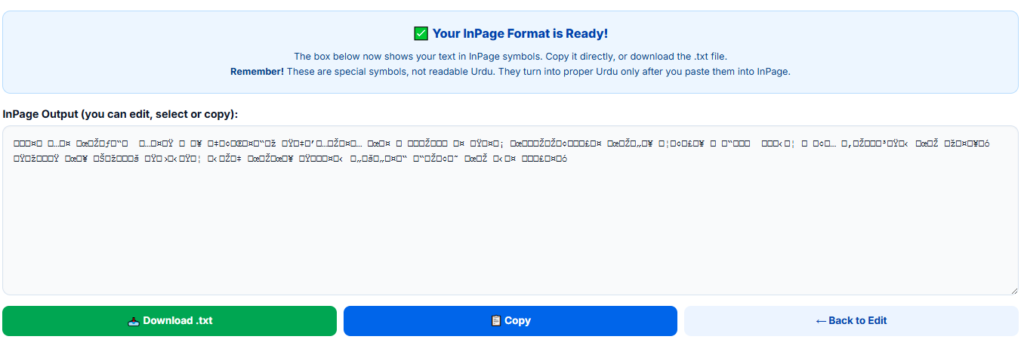
The box below now shows your text in InPage symbols. Copy it directly, or download the .txt file.
Remember! These are special symbols, not readable Urdu. They turn into proper Urdu only after you paste them into InPage.
How to Use the Unicode to InPage Converter
- Paste your Urdu text. Copy the Unicode text from a website, Word file or WhatsApp chat and paste it into the box above.
- Press Convert to InPage. The box switches to InPage symbols. They look like random characters, and that's normal.
- Fix anything you want. The result box is editable, so you can correct a line before you move on.
- Copy or download. Use the Copy button, or download the .txt file, open it in Notepad and copy everything inside.
- Paste into InPage. Open your InPage document and paste. The symbols turn into Urdu text there.
What Is a Unicode to InPage Converter?
A Unicode to InPage converter takes Urdu written in Unicode, the standard your phone, browser and Word all use, and rewrites each character as the code InPage expects. Both versions spell the same Urdu words. They just store them differently.
That leaves two options: retype everything inside InPage, or convert the text first. This tool handles the second one.
Unicode vs InPage: What's the Difference?
The table below shows how the two formats compare in everyday use.
| What to compare | Unicode Urdu | InPage format |
|---|---|---|
| Standard | Universal, maintained by the Unicode Consortium | Legacy encoding used by InPage software |
| Where it works | Websites, phones, WhatsApp, Word and most apps | InPage documents on Windows and macOS computers |
| Typical use | Web content, chats and files you share | Newspaper, magazine and book layout |
| Fonts | Any Unicode Urdu font | Fonts that come with InPage |
| In Notepad | Readable Urdu letters | Unreadable symbols |
Why Use This Unicode to InPage Converter?
Retyping a full page in InPage takes hours. Here is what this Unicode to InPage converter does to cut that down.
Your text stays in your browser
The conversion runs on your own device. ud2ools never receives what you paste, which matters when you’re working on an unpublished article or a client’s manuscript.
Edit before you copy
The result appears in the same box you typed in, and you can change it right there. No second screen, no extra window.
Copy it or save it as a file
One click copies everything. If you’d rather keep a backup, the .txt download gives you the same text as a file.
Free, with nothing to install
No account, no watermark, no software. Open the page and use it on a phone or a computer.
What Does the Unicode to InPage Converter Support?
Here’s what this Unicode to InPage converter handles, so nothing surprises you later.
- Converted: the everyday Urdu alphabet, including ٹ ڈ ڑ ں ھ ہ ے ئ ؤ and آ, plus Urdu digits (۰ to ۹) and common punctuation such as the Urdu comma, full stop (۔), question mark (؟) and brackets.
- Passed through as they are: English letters, English numbers, and your line breaks and tabs.
- Not converted: zabar, zer, pesh, shadda and other diacritics, plus rare characters such as ۃ, ۂ and ۓ. Anything the tool can't map is replaced with a question mark, so scan the result for "?" before you print.
- Not carried over: bold, colors and font sizes. The tool works on plain text only.
Who Uses a Unicode to InPage Converter?
Anyone who gets Urdu text from one place and needs it in InPage. Some common cases:
- Newspaper and magazine staff moving reporter copy from email or WhatsApp into a page layout.
- Book publishers and typesetters working from an author’s Word file.
- Designers laying out posters, visiting cards and brochures for print.
- Print and stationery shops that receive customer text on WhatsApp and have to set it for printing.
- Students and writers whose typed drafts need to go into an InPage file.
Tips for Cleaner Results
A few habits make any Unicode to InPage converter give you cleaner output.
- Test one short line first. Paste it into InPage and check it before you convert a whole document.
- Paste plain text. Copying from a website or chat works better than copying from a PDF, which often scrambles Urdu letters.
- Clean up extra spaces and blank lines before converting. The tool copies them exactly as they are.
- Search the result for “?” before you paste it into InPage. Each one marks a character the tool couldn’t convert.
- If the pasted text looks wrong in InPage, use the .txt download instead of Copy. Open the file in Notepad, select all, copy, and paste again.
Frequently Asked Questions
It’s a tool that rewrites Urdu Unicode text as the encoded symbols InPage uses. You paste normal Urdu in and get symbols out. Those symbols show up as Urdu once you paste them into an InPage document.
Yes. It’s free, needs no sign-up and doesn’t ask you to install anything.
Paste your text into the box, press Convert to InPage, then use Copy or download the .txt file. Paste the symbols into InPage. The five steps above walk through it.
No. The conversion happens in your browser, and the text you paste isn’t sent to ud2ools or anywhere else. Close the tab and it’s gone.
That’s how InPage encoding looks outside InPage. Each Urdu letter becomes a pair of codes, and a plain text box shows those codes as odd characters, some of them invisible. They only read as Urdu once they’re pasted into InPage.
Yes. The result stays editable, so you can fix a word or delete a line before you copy or download. Avoid retyping symbols by hand. If the Urdu itself needs a change, press Back to Edit, which restores your original text, and convert again. Changes you made to the symbols are dropped.
Not at the moment. The converter handles the everyday Urdu alphabet, digits and common punctuation. Diacritics and a few rare characters come out as a question mark, so check for those and add the marks inside InPage.
Yes, the Unicode to InPage converter works on phones and tablets. InPage itself runs on Windows and macOS computers, though, so you’ll need to move the converted text to your computer before you paste it.
No. The Unicode to InPage converter handles plain text only. Line breaks are kept, but bold, colors and font sizes have to be set again in InPage.
Not with this tool. It only goes one way, from Unicode to InPage. If you need the reverse, tell us through the Contact Us page.