
Event QR Code Generator
Free Digital Invitation Maker
This event qr code generator turns your event details into one scannable code. Guests scan it with their phone camera and see a clean digital invitation card with the date, time, venue, organizer and ticket link. It works for weddings, birthdays, meetups and conferences. It is free and needs no signup.
How to Use This Event QR Code Generator
- Type the event name. Add a short description if you want one.
- Pick the start and end dates, the times and your time zone.
- Enter the organizer name. Phone, email and organization are optional.
- Add the venue, the full address and a Google Maps link if you have one.
- Choose Free Event or Ticketed Event. For a ticketed event, paste your ticket link.
- Click Generate QR Code, then Download PNG. Use Preview Card to see exactly what your guests will see.
- Pick the start and end dates, the times and your time zone.
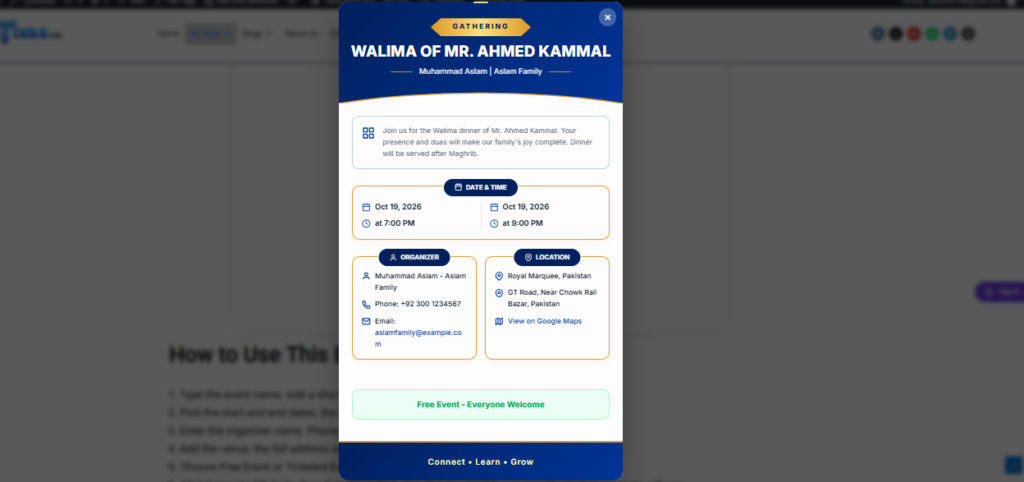
What Details Can You Add to the QR Code?
The event qr code generator has five sections. Only the event name, dates, times and organizer name are required. Everything else is optional, so you can keep the card short or detailed.
| Section | What You Enter | Required? |
|---|---|---|
| Event Information | Event name and a short description | Name required, description optional |
| Date & Time | Start and end date, start and end time, time zone | Yes |
| Organizer | Name, organization, phone and email | Name required, rest optional |
| Location | Venue, full address and Google Maps link | Optional |
| Ticket Information | Free event, or ticketed event with a purchase link | Optional |
Why Use an Event QR Code Instead of a Plain Invitation?
Everything Arrives in One Scan
Guests do not have to read a long message or save five different details. One scan shows the date, time, venue, organizer and ticket link together on a single card.
Works With Any Phone Camera
Most modern phones can scan a QR code from the default camera app. Guests do not need to install anything to see your invitation.
No Signup and No Watermark
You can use this event qr code generator without creating an account. The QR code you download is clean, so it looks good on printed cards and posters.
Easy to Share Online and in Print
Download the code as a PNG. You can send it on WhatsApp, post it on social media or print it on a card or banner.
Where Can You Use an Event QR Code?
- Wedding and engagement invitation cards
- Birthday and family gathering invites
- Conference, seminar and workshop posters
- School, college and community events
- Shop openings and promotional events
- Meetups and club announcements
Tips for a QR Code That Scans Every Time
- Keep the description short. A longer description makes the QR pattern denser and harder to scan.
- Print the code at least 2.5 cm (about 1 inch) wide so cameras can read it easily.
- Keep the dark squares on a white background. Do not change the colors or stretch the image.
- Test the code with two different phones before you print hundreds of cards.
- Check every detail before you download. The details are saved inside the code, so a mistake means you must make a new one.
Is Your Event Data Safe?
Your details are packed into the link inside the QR code itself. ud2ools does not save them in a database. This also means anyone who has the QR code can see what is on the card. When you use this event qr code generator, add only information you are happy to share with your guests, and leave out private details like a home address if you do not need it.
Frequently Asked Questions About the Event QR Code Generator
An event qr code generator is a tool that puts your event details inside a QR code. When someone scans it, they see the event name, date, time, location, organizer and ticket information on one card.
Yes. It is free to use, needs no signup and adds no watermark to your QR code. You can make as many codes as you need.
Their phone opens this page on ud2ools, and the invitation card appears on the screen straight away. The card shows your event details, a map link if you added one, and a ticket button for ticketed events.
Yes. Fill in your own event details and print the QR code on a card, poster or banner. It works for weddings, birthdays, conferences, meetups and any other gathering.
No. The details are stored inside the code, so a change means you must generate a new one. Check everything with Preview Card before you download or print.
Yes. Choose Ticketed Event and paste your ticket link. Guests will see a Get Tickets Now button on the card. Only links that start with http or https are accepted.
Make Your Event QR Code Now
Add your details, click Generate QR Code and download your file in under a minute. If you want more free utilities after this, browse the other tools on ud2ools. You can also read how QR codes work on Wikipedia.