ud2ools.com

Free CV & Resume Maker Online
(No Sign-Up)

Use this free CV resume maker to pick a template, type in your details and download a finished CV as a PDF, image or Word file in a few minutes. It’s free, there’s no account to create, and everything runs inside your browser, so your details and photo stay on your device.

Built and maintained by Muhammad Usman, founder of ud2ools · Last updated: September 2026

✦ Free Forever — No Account Needed

CV Resume Maker Pro

Choose a professional template and build your perfect CV in minutes

👤
Alex Johnson
Designer
Contact
📞 +1 234 567 890
✉ alex@email.com
Skills
Photoshop
Language
English
Alex Johnson
Graphic Designer
Experience
Creative Agency
2020 – 2023
Popular
Classic Sidebar
Dark sidebar with skill bars
👤
Olivia Wilson
Marketing Manager
📞 +1 234 567
Profile
Marketing professional with 5+ years experience...
Skills
Management
Experience
Global Corp
Modern Two-Column
Bold header, split layout
Jonathan Patterson
SENIOR EXECUTIVE
👤
SKILLS
Leadership
EXPERIENCE
Fortune 500 Inc.
Executive Clean
Dark header, gray sidebar
👤
GRAPHIC DESIGNER
CONTACT
📞 +1 234 567
Richard Sanchez
Graphic Designer
EXPERIENCE
Design Studio
Minimal Bold
Dot skills, accent nameband
👤
Lorna Alvarado
Marketing Manager
CONTACT
📞 +1 234 567
PROFILE
Dynamic professional...
Elegant Split
Deep sidebar, card layout
CV Resume Maker Pro
Your Profession
Select your field so we can suggest relevant content for your CV
💼Select Category
🎓Student
📚Teacher
💻Developer
🎨Designer
📈Marketing
🏥Doctor
⚙️Engineer
📊Accountant
⚖️Lawyer
📸Profile Photo (Optional)
📸

Click to upload photo
JPG, PNG supported

Passport-size photo (fixed 3.5:4.5 ratio). Drag to reposition, zoom, rotate, or flip as needed.

CV Resume Maker Pro
Personal Information
Fill in your details — all fields are editable later in the preview too
👤Basic Details
🌍Languages
CV Resume Maker Pro
Skills, Objective & Education
AI has suggested content based on your selected category — feel free to edit
⚙️Skills
🎯Career Objective / Profile Summary
🎓Education
CV Resume Maker Pro
Work Experience
Add your work history — AI has pre-filled a sample you can edit
💼Experience Entries

⬇ Download CV

Processing...

What Is the ud2ools CV Resume Maker?

The ud2ools CV Resume Maker is a free browser-based tool that builds a formatted CV from your details. Choose one of five templates, fill in your information, tweak the colours, and download it as a PDF, image (JPG, PNG or WEBP) or Word file. No account or software needed.

A quick word on what this CV resume maker isn’t. The suggested skills, profile and experience lines are pre-written for each profession. They aren’t generated by AI on the spot, and they’re there to save you from a blank page, not to be sent as they are. Replace them with your own real details before you download.

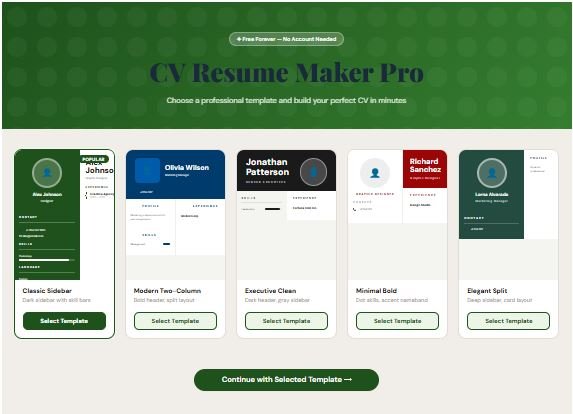
ud2ools CV resume maker showing five CV template previews

How to Make a CV Online in 5 Steps

  1. Choose a template. Pick from Classic Sidebar, Modern Two-Column, Executive Clean, Minimal Bold or Elegant Split. Colours can be changed later, so go with the layout you like best.
  2. Select your profession. Choose one of nine fields (Student, Teacher, Developer, Designer, Marketing, Doctor, Engineer, Accountant or Lawyer) or type your own. You can also add a photo here and crop it to passport size.
  3. Enter your personal details. Add your name, job title, phone, email and address. Father’s name, CNIC, date of birth, marital status and website are optional, and you can add your own extra fields and languages.
  4. Review skills, profile, education and experience. Sample text is pre-filled to get you started. Rewrite it so it matches your real background.
  5. Preview, edit and download. Click any text on the preview to change it, adjust the six colour controls, then download your CV as a PDF, image or Word file.

Why People Use This CV Resume Maker

# Icon (Font
Awesome)
Title (H3) Description
11 table-columns Five real
templates
Sidebar, two-column, executive, minimal and split layouts, so you're not stuck with one look.
12 pen-to-square Edit right on the
preview
Click any name, title or line on the CV and type. No jumping back to forms for small fixes.
13 palette Six colour
controls
Change the header, header text, accent, sidebar, body text and heading colours until it matches your style.
14 image-portrait Passport-size
photo cropper
Upload a photo, then drag, zoom, rotate or flip it inside a fixed 3.5:4.5 frame.
15 file-arrow-down PDF, image or
Word
Export in the format the employer or app asks for. JPG, PNG and WEBP are all available for images.
16 shield-halved Private by design Your CV details and photo are processed in your browser and are never uploaded to our server.

PDF, Image or Word: Which Download Should You Choose?

All three downloads from this CV resume maker look identical, because each one is generated from the same preview.

FormatBest forGood to know
PDFEmailing employers, sending to HR on WhatsApp, printing on A4Fixed A4 layout. Text can't be selected or copied.
Image (JPG, PNG, WEBP)Sharing in chats or on social media, or uploading where a picture is acceptedPNG keeps text edges sharpest, JPG gives the smallest file. WEBP is small, but a few older apps can't open it.
Word (.doc)Employers or agencies that specifically ask for a Word fileYour CV sits in the document as a full-page picture, so the text can't be edited in Word.

One thing to know before you download: every format here saves your CV as a picture of the page. That keeps the design exactly as you see it, but it also means the text can’t be selected, copied or edited afterwards. Make your changes in the preview first, and download again if you need a new version.

What Should You Put on a CV?

A good CV isn’t about fancy design. It’s about what a busy reader can find quickly.

Recruiters Skim First

TheLadders’ 2018 eye-tracking study found that recruiters spend about 7.4 seconds on their first look at a resume, a little longer than the 6 seconds measured in its 2012 original. In that first version, roughly 80% of the viewing time went to the name, job titles, employment dates and education. So put those four things where the eye lands first, and keep the rest short and clean.

Details Often Included on Pakistani CVs

Some employers in Pakistan expect a photo, father’s name, date of birth, CNIC number and marital status, and this tool has fields for all of them. Add them when the job advert or employer asks. A CNIC number is sensitive, so think twice before putting it on a CV you’ll post in public groups or on open job sites.

Details to Leave Out for International Applications

For jobs in the US, UK or Canada, employers generally don’t expect a photo, date of birth, marital status or ID numbers, and leaving them out is the safer default. Every field except your name is optional here, so you only fill in what you need.

Write Lines a Person Can Check

Swap the sample text for things that really happened. What did you do, how often, and what changed because of it? “Handled customer billing and cut errors by keeping a daily checklist” reads better than “hardworking team player”, and you can explain it in an interview.

Who Is This CV Resume Maker For?

Students and fresh graduates writing a first CV
Job seekers changing roles or industries who want a fresh layout
Anyone who needs a CV quickly on a phone, ready to share by WhatsApp or email
Applicants for jobs where a photo and personal details are expected

CV vs Resume: What's the Difference?

Is a CV the same as a resume?

In Pakistan and much of the world, yes. People use both words for the same one-to-two-page summary of your education, skills and work history. In the US and Canada, a “CV” usually means a longer academic document, while a resume is the short job-application version. This tool makes the short version.

What is an ATS, and will this CV work with it?

An applicant tracking system (ATS) is software some companies use to read and sort CVs before a person sees them. Because the PDF, image and Word downloads here are pictures of your CV rather than live text, an ATS may not be able to read them. If a company asks you to upload through an online portal, send a plain, text-based file instead, for example a document typed in Word. Use this CV resume maker for emailing a real person, sharing on WhatsApp, or printing.

Frequently Asked Questions

Yes. You can build and download as many CVs as you like without paying, and there’s no watermark on the result.

No. Open the page, pick a template and start typing. There’s no login, no email verification and no app to install.

No. Your details and photo are handled inside your browser and are not sent to our server. The page only loads its fonts and two file-creation libraries (jsPDF and html2canvas) from public content delivery networks.

No. Nothing is stored, which is good for privacy but means a refresh or a closed tab clears everything. Download your CV before you leave, and keep your details somewhere handy in case you want to rebuild it later.

Not the downloaded file. PDF, image and Word exports are pictures of the CV, so the text can’t be edited afterwards. Fix everything in the live preview first (just click the text), then download again if you need changes.

Not reliably. Our downloads are pictures, and many ATS tools can’t read text from pictures. For online application portals, upload a plain text-based CV instead, and use this maker for emailing, sharing and printing.

No. The skills, profile, education and experience lines are pre-written samples for nine common professions, plus a general starter if you type your own. Treat them as a first draft and replace them with your real details.

Yes. Upload an image (JPG or PNG work best, up to 15 MB), then drag, zoom, rotate or flip it inside a fixed passport-size frame with a 3.5:4.5 ratio. A clear, front-facing photo on a plain background looks best.

Yes, the tool is responsive and works in mobile browsers. Editing is easier on a larger screen, and downloads can behave differently between phone browsers, so if one doesn’t start, try Chrome.

Colours, yes: header background, header text, accent, sidebar, body text and heading colours can all be changed. Fonts are fixed for each template to keep the layout tidy.

More Free Tools from ud2ools

coming soon

coming soon

coming soon

Ready to Build Your CV?

Scroll back up, to the CV resume maker, pick a template and have a finished CV in a few minutes.

Scroll to Top